One Person Business: Six Things to Track Each Week
One person business owners can track six signals each week to see open work, unpaid invoices, hours and profit, with a simple review and example.
By Notion Business Planner by Cosmo Suite · Editorial policy
Published · 8 min read

A one person business needs a small set of records that answer six questions: who might hire you, what work is underway, how much time is committed, who still owes you, what the business earns and spends, and what needs attention next. Review those signals each week and you can spot a crowded schedule, a quiet pipeline, or an overdue invoice before it gets buried in notes and email.
Use the weekly view to organize work, and keep bookkeeping in its own recordkeeping system. Keep receipts, invoices, and other source documents in the records you use for accounting. This guide gives you a weekly review, a made-up example, and a practical way to decide what to update first.
Key takeaways:
- Track new inquiries, open projects, hours, unpaid invoices, income and expenses, and one next action.
- Keep unpaid invoices separate from money received.
- Use the review to spot a workload or follow-up problem, then choose a dated next step.
- Keep invoices and receipts with the records that support your financial summary.
One Person Means One Calendar to Protect
A solo owner has to make time for both client work and the tasks that keep work moving. A new inquiry needs a reply, a live project needs delivery time, and an unpaid invoice needs a follow-up at the right point in its terms. When those details sit in separate notes, it is easy to promise work without seeing what the week already holds.
Keep the weekly view simple: show what is open, which dates matter, and where the next decision belongs. That is why the review below keeps business development, delivery, time, and money in the same small picture.

One-Person Business Tracking at a Glance
A useful weekly review puts demand, delivery, time, and money in one place, then ends with a next action. Start with these six signals:
| Signal | What to record | Question it answers | Action trigger |
|---|---|---|---|
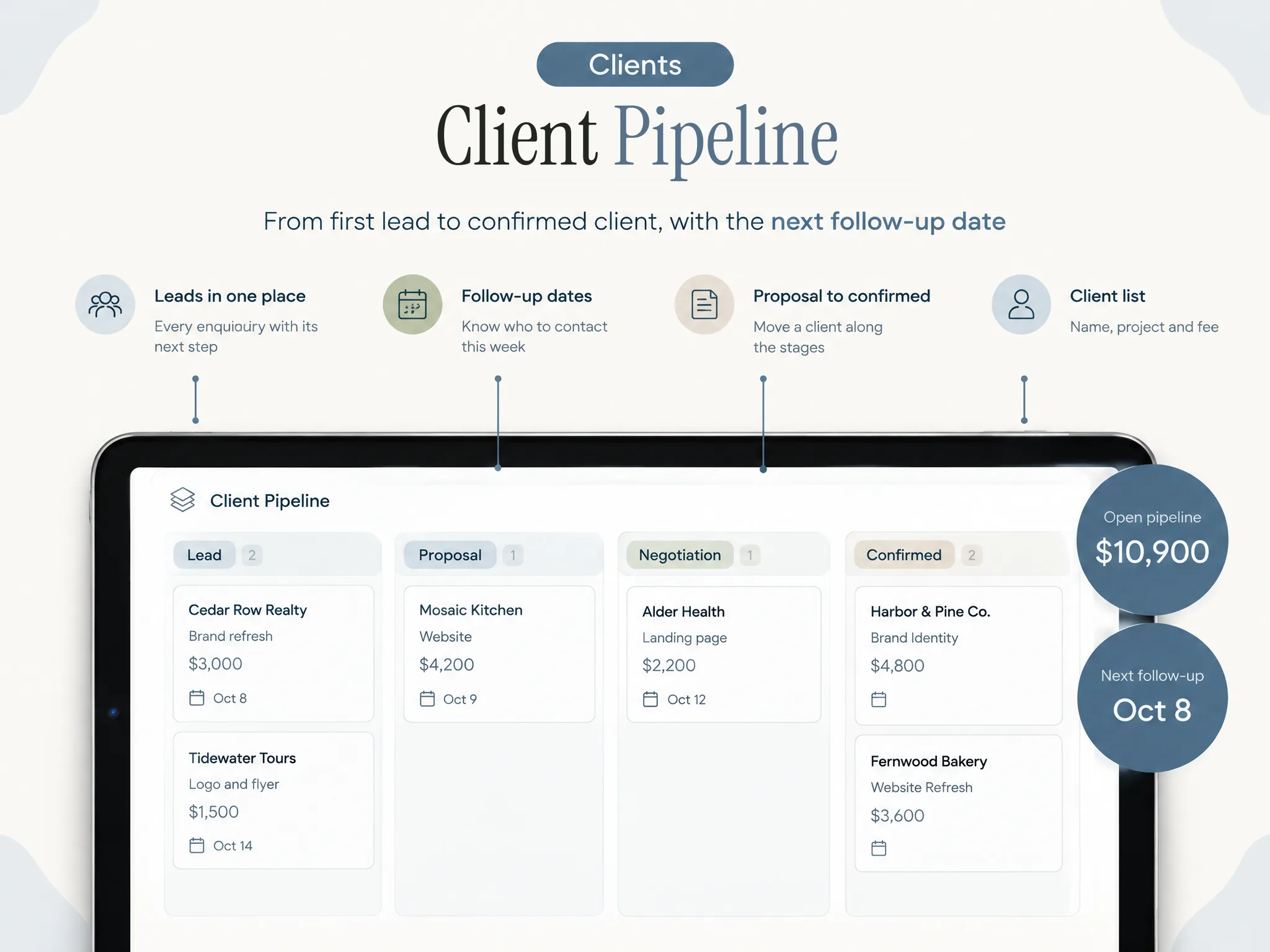
| New inquiries | Name, service, status, next follow-up date | Who might hire me? | No next step or date |
| Open projects | Client, deliverable, due date, status | What have I promised? | Deadline or decision is close |
| Hours | Planned and logged time by project | How much room is left? | Work is taking more time than planned |
| Invoices | Amount, issue date, due date, status | Who owes me? | Due date has passed or payment arrived |
| Income and expenses | Money received and business costs, with source records | What did the business earn and spend? | A record is missing or a target is off track |
| Next action | One task, owner, date | What should I do first? | A blocker has no owner or date |
Use this table as a management view. Keep an income ledger and the supporting invoices and receipts for your accounting records. The IRS says a recordkeeping system can vary, but should clearly show income and expenses. Ask a qualified professional about the rules for your business.
If you are still deciding what your business offers and whom it serves, use this one-page freelance business plan guide to set the direction first. A Notion business planner for tracking clients, projects, and finances can keep those details together, but a notebook or spreadsheet works if you keep it current.
The Six Signals to Track Each Week
Review inquiries, projects, hours, invoices, income and expenses, then choose one next action. Keep the fields small enough to update when something changes.
1. New inquiries and follow-ups
Record the person or business, what they asked about, where the conversation stands, and when you will follow up. A useful pipeline entry also states where the conversation stands and when you will follow up.
The SBA’s market research guide describes research as a way to understand customers, demand, location, and alternatives. For a solo service provider, this can be as simple as writing down which conversations turn into paid work and what those clients asked for. Do not treat a few inquiries as proof of a broad market trend; use them to choose a sensible next question.
2. Open projects and deadlines
List each active commitment with the next deliverable, its due date, and a clear status. “Website project” hides too much. “Send homepage draft to client by Thursday” gives you a checkable action.
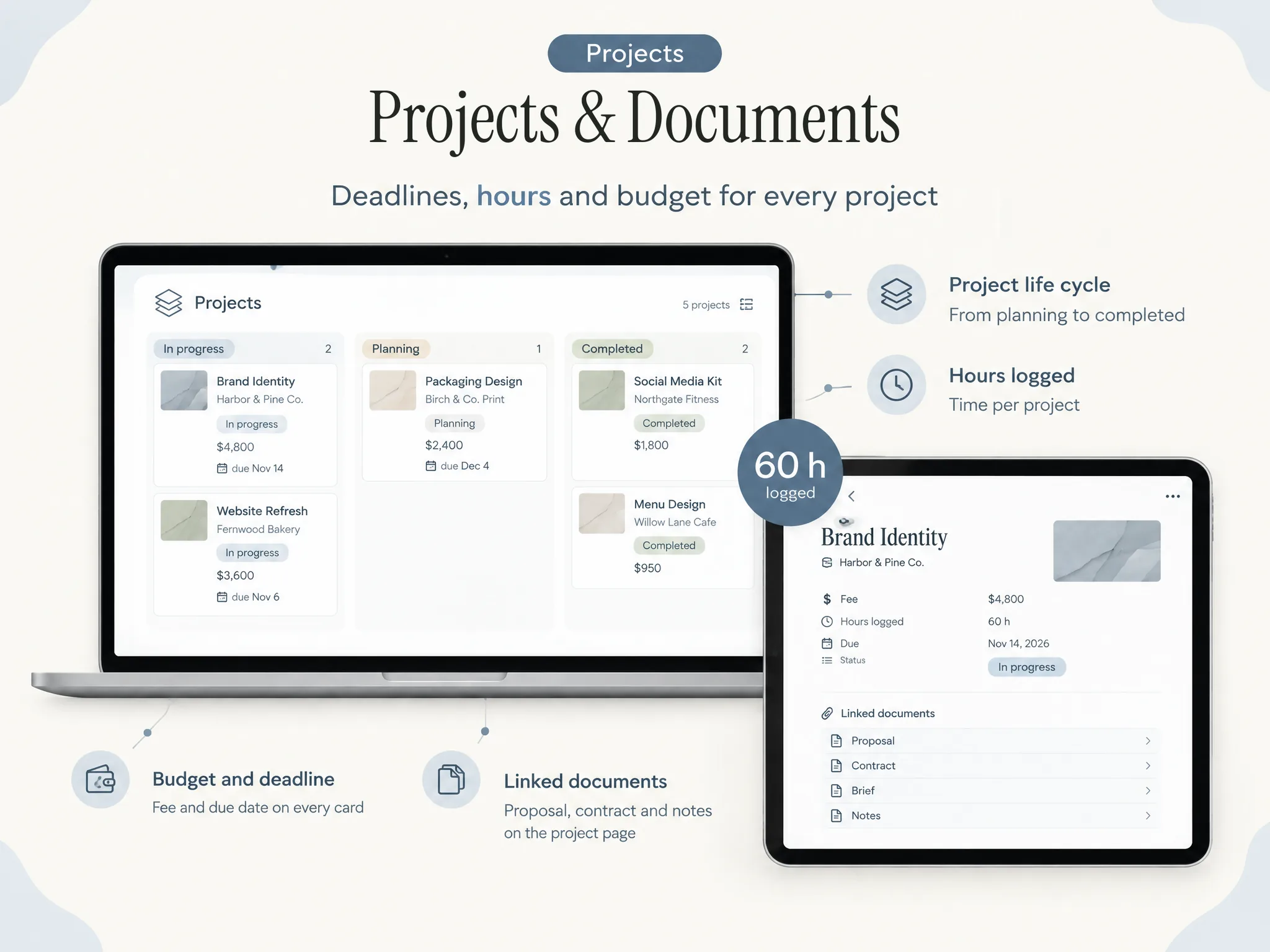
When a client asks for another task, add it before agreeing to a date. Then look at the work already promised. This habit helps you notice a week that is full before you accept another deadline.
3. Hours committed and hours used
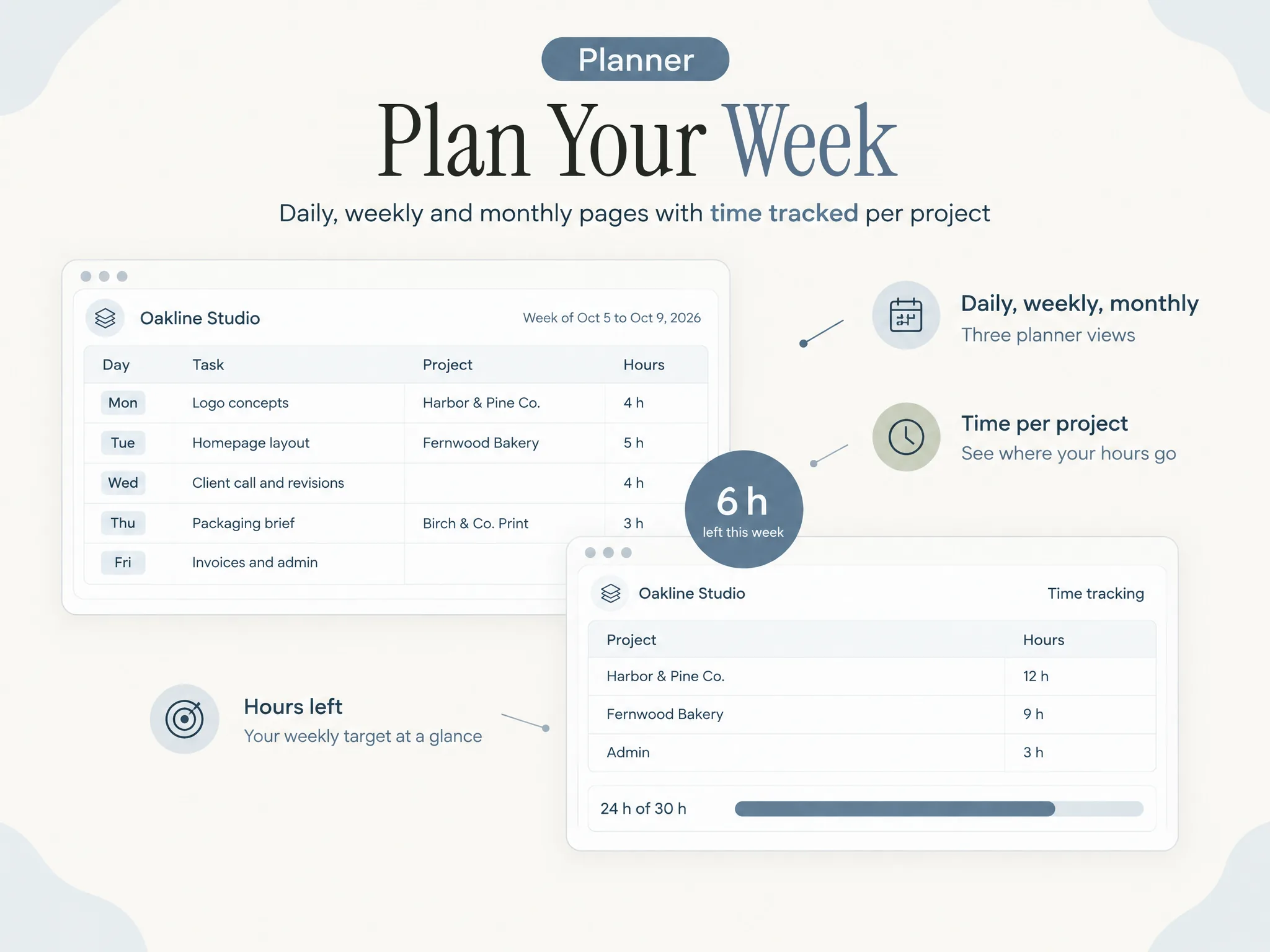
Track the hours you plan to spend and the hours you actually log for each project. Compare the two to see whether a job is taking more of your time than expected and whether the week still has room for admin and follow-ups.
If estimates keep missing, adjust the next quote or scope conversation. A time log also shows which services take longer than the invoice suggests. Read it alongside your costs, income needs, and agreed scope when you set a rate.
4. Invoices due and payments received
Track the invoice amount, issue date, due date, and whether it is unpaid, partly paid, or paid. Keep the invoice itself and proof of payment with your financial records. A list of unpaid invoices answers “who owes me?”; it is not the same as money already received.
Use the due date and payment terms you agreed with each client to decide when to follow up. Show pending invoices separately from money received. Your monthly total will be clearer.
5. Income, expenses, and profit against a target
Record the money that came in, the costs the business paid, and the period each entry belongs to. The IRS recordkeeping guidance says your system should clearly show income and expenses and points to supporting documents such as invoices and receipts. Its requirements can depend on the business, so use official guidance or a qualified professional for your situation.
Keep tax calculations separate from this weekly check. A simple tracker can show a set-aside field if you use one, but it cannot decide the right tax rate or make a return tax-ready. Do not label a rough margin or cash balance as profit without checking how you define the terms.
6. The next action and your capacity
End the review by choosing one action that makes the coming week clearer: send a follow-up, confirm a scope change, finish a client deliverable, or file a missing receipt. Add a date so the task does not disappear into a general to-do list.
Then compare your commitments with the hours you expect to spend. If the week is full, move a task, renegotiate a deadline, or decline new work. Plan around the capacity of one person.
What a Fictional Solo Designer Sees in One Week
A solo designer’s weekly review could connect commitments, time, and payments in one small table. The example below is made up; it is not a benchmark or a report of real client work.
| Work item | Hours planned | Hours logged | Invoice status | Next action |
|---|---|---|---|---|
| Brand package for Cedar Studio | 8 | 6 | $1,200 due Friday | Finish two logo options |
| Website update for North Market | 5 | 7 | $900 unpaid, due Monday | Confirm the extra revision scope |
| New inquiry from Bright Dental | 0 | 0 | No invoice | Reply with two questions and a call time |
| Admin and bookkeeping | 2 | 1 | Not applicable | File three receipts |
The hours planned total 15. The logged hours total 14. One project has used two more hours than planned, while one deliverable still needs work. The $900 invoice is still unpaid, so it does not belong in cash received. The new inquiry has no booked work yet, so it should stay separate from project hours.
The designer could confirm whether the extra revision is included, finish the promised options, and send the inquiry a reply with a realistic start date. If the payment terms allow it, the overdue invoice can be followed up on after its due date. The point is to make the choices visible before the next week starts.
Keep the sample rows separate from your own records. Replace them with your real clients, commitments, and hours, and retain the documents that support money entries.
What Actually Keeps a One-Person Business Moving
The six signals help when they are current and lead to a decision. A large dashboard full of stale entries can be harder to use than a short list you update when work changes.
- Record the change when it happens. Add a new inquiry, agreed deadline, invoice, or expense while the details are still easy to confirm.
- Review exceptions first. Look for overdue payments, missing next steps, project hours that have run past the estimate, and costs without a receipt.
- Protect time for delivery. Your inquiry list matters, but promised work still needs time on the calendar.
- Choose one next action. Turn “follow up with clients” into a named task with a date.
The Census Bureau defines nonemployers as establishments with no paid employees that meet its tax and receipts rules. Its definition also includes some partnerships and corporations, so the category is not a direct count of one-person businesses.
The planner’s dashboard of income, unpaid invoices, hours, and active projects is built around the same kind of weekly questions. You can use the same six-signal view in any tool that you will keep updated.
Why Trust This Article
Notion Business Planner by Cosmo Suite makes the template discussed below, so we have a stake in it. The tracking method can also be done in a notebook or spreadsheet. We checked the Census, IRS, and SBA pages on 19 October 2026. The designer and every figure in that example are fictional. This article is not tax, accounting, or legal advice. See our editorial policy and about page for how we handle sources and corrections.
Where Notion Business Planner Fits
Notion Business Planner is a Notion template with a dashboard for income, expenses, profit against target, and unpaid invoices. Its client pipeline includes follow-up dates. Its project pages include deadlines, budgets, and hours, and its planning pages include time tracking. These are the parts that map to the six-signal review.
The template gives you pages to organize and review information. You still enter and verify your own records. It does not issue invoices or file taxes. If you want a ready-made set of pages for tracking a solo business in Notion, check that the listed sections fit the way you work before you adopt it.
Frequently asked questions
What should a one-person business track each week?
Review new inquiries, open projects, hours committed, unpaid invoices, income and expenses, and the next action. Keep source records such as invoices and receipts where you can find them.
How often should a one-person business review its numbers?
A short weekly review can catch overdue work and follow-ups. Reconcile financial records on a schedule that suits your business and any professional guidance you follow.
Do I need accounting software to track a one-person business?
Not necessarily. The IRS says a suitable recordkeeping system should clearly show business income and expenses. Keep supporting documents and check whether your business has specific requirements.
What is a nonemployer business?
The U.S. Census Bureau uses nonemployer statistics for businesses with no paid employees that meet its tax and receipts rules. The category includes more than sole proprietors, so it is not identical to one-person businesses.
How do I track invoices that have not been paid?
Record the client, invoice amount, issue date, due date, and status. Check the due date and follow the payment terms you agreed with the client. A tracker does not send or collect an invoice for you.
Can I run a one-person business in Notion?
Yes. Notion can hold a manual view of clients, projects, hours, and business records. Choose a setup you will keep current, and retain the documents required for your accounting and tax records.
Sources
Keep reading

Plan the Business
Freelance Business Plan: A One-Page Plan You Can Fill In Today
Freelance business plan in one page: six sections to fill in, a worked example for a solo designer, and a quarterly review so the plan stays alive.
· 8 min read
Plan the Business
Quarterly Planning for a One-Person Business: A 3-Hour Session, Step by Step
Quarterly planning for one person, run as a single session: review last quarter, count your real hours, pick up to three goals and book your review dates.
· 9 min read

Plan the Business
Marketing Plan Template for Small Business: A One-Person Channel Plan
Marketing plan template for small business: organize your buyer, offer, channels, actions, and review dates in one clear plan for a solo service business.
· 9 min read
