Notion Business Planner: What to Look For Before You Choose
Notion business planner checklist for solo service owners: compare goals, money, clients, projects and weekly planning before choosing a workspace.
By Notion Business Planner by Cosmo Suite · Editorial policy
Published · 9 min read
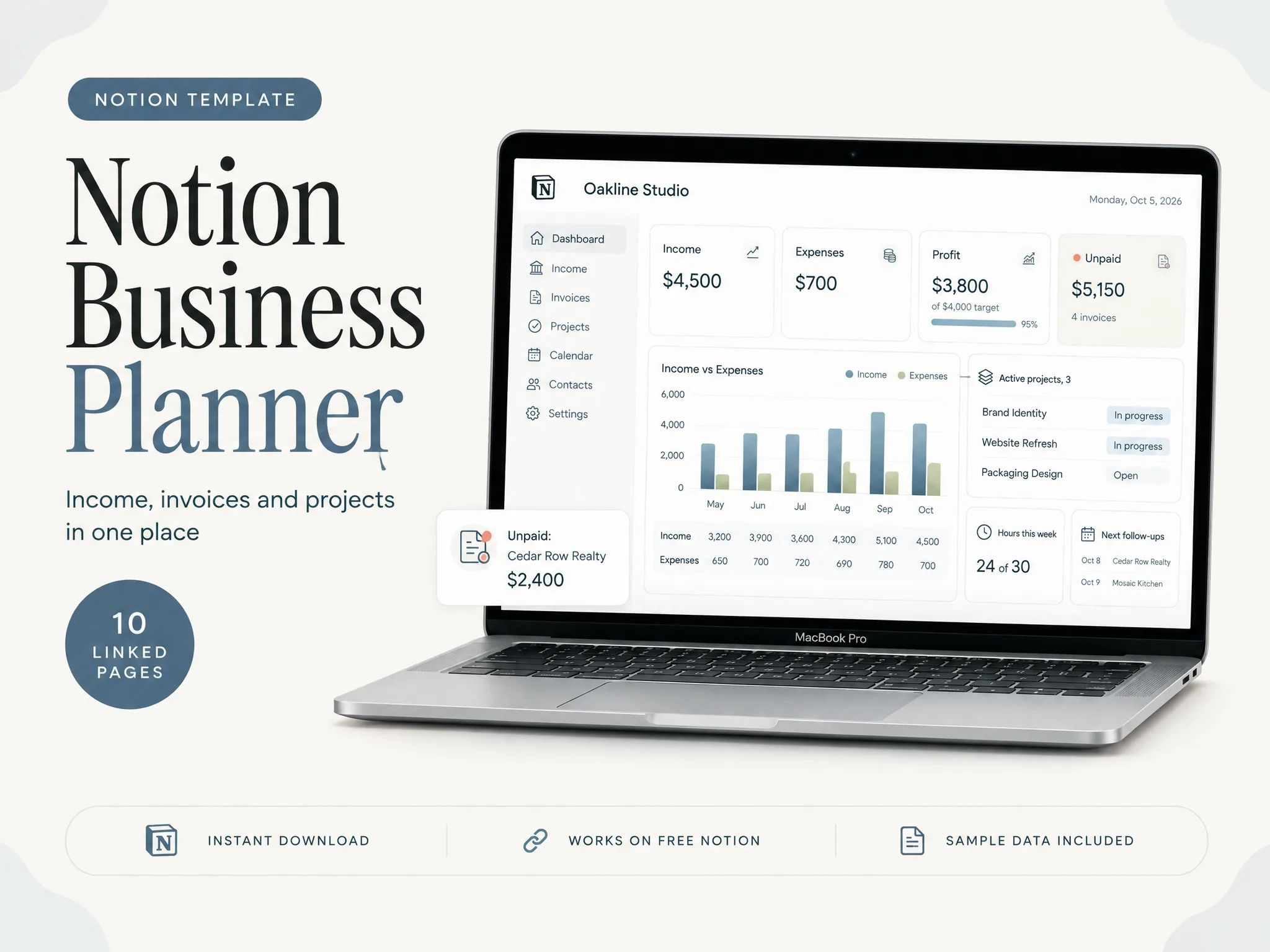
A Notion business planner helps you make the decisions that keep a one-person business moving. You can see what to work on, what money came in, who still owes you and whether this week's work fits your goals. The word “planner” can mean anything from a calendar to a full operating workspace, so compare the pages before you choose one. If you want a ready-made set of pages, the Notion Business Planner template publishes its contents so you can compare them with your routine.
Start with the routine you already follow. If you review income monthly, track project hours and plan the week on Sunday, those tasks show what the workspace needs to support. A long list of pages adds little when you do not use it.
This guide gives you a checklist for comparing a do-it-yourself setup with a ready-made template. It also shows exactly what the Notion Business Planner includes, using its published contents list and product screenshots. The examples explain the structure; the values shown in the images are sample data.
Key takeaways:
- Match pages to real decisions you make each week or month.
- Check that money, invoices, clients, projects and time have clear places.
- A Notion workspace organizes records; it does not replace bookkeeping or tax advice.
- The Notion Business Planner has linked pages for planning, finances, clients, work and learning.
What a Notion Business Planner Should Hold
A useful business planner should connect your goals to the work and money you review. For a solo service provider, that usually means a small set of pages that answer “what is happening?” and “what should I do next?”
| Area | What to keep | Question it helps answer |
|---|---|---|
| Goals | Annual direction, quarterly goals and next actions | What am I trying to change this quarter? |
| Money | Income, expenses, profit and a target | How is this month going against my target? |
| Invoices | Amounts, due dates and paid status | Who owes me, and what needs follow-up? |
| Clients | Leads, stage and next follow-up | Which conversation should I move forward? |
| Projects | Budget, hours and documents | Is the work staying within the plan? |
| Time | Daily or weekly plan and hours by project | Where did my working time go? |
| Marketing | Channel plans and content ideas | What action will help people find my service? |
Use the table as a starting checklist, then tailor it to the questions you review. A new freelancer may need only goals, a project list and a way to track money. Someone with recurring clients may need follow-up dates and invoice status each day. Add a page when it supports a task you repeat.
The SBA's guide to writing a business plan is a useful reminder that planning should fit the purpose. A solo operator can keep an operating plan short and revisit it; a lender or grant application may call for a different document.
Build Your Own or Start From a Template?
Build a custom setup when you want full control; choose a template when its structure already matches your routine. Either way, you will need to enter your information and decide what to review.
| Choice | Good fit when | Trade-off |
|---|---|---|
| Build it yourself | You know the exact pages and fields you want | You design the databases, views and links before using them |
| Start with a template | You want a prepared starting structure | You may need to hide or adapt pages you do not use |
| Keep it simple | You only need a few lists and a calendar | Related records may stay spread across separate pages |
Before choosing, list the tasks the workspace must support, pages that could help later and work that belongs in another system. A solo designer may need project hours to inform future quotes. A course tracker can wait until there is a course in progress. Tax filing stays in the required filing process, even when a planner helps estimate money to set aside.
Then ask how each option handles an ordinary update. When a project changes, can you find its budget and logged hours together? When an invoice becomes paid, can you update its status without searching several pages? When the month closes, can you compare the result with your target? These checks expose setup gaps better than counting how many pages a template advertises.
Notion describes databases as collections of pages that can be viewed in different ways. Linked records and filtered views can help structure a planner. They can also make the setup larger than you need. Read Notion's database overview before you decide whether to build the relations and views yourself. Notion's guide to database relations explains how linked records can connect clients with their projects. Its database template guide shows how repeatable page structures work.
If you are sketching the business itself before choosing a tool, this one-page freelance business plan gives you the decisions to record first. A workspace can hold that plan, but it cannot choose your client, offer or target for you.
What the Notion Business Planner Includes
The Notion Business Planner groups business planning, finances, clients and work in one template. Its contents list includes a Dashboard, Business Plan and Goals, Finances, Client Pipeline, Projects and Documents, Brand and Services, Productivity, Marketing, Self-learning and Getting Started.
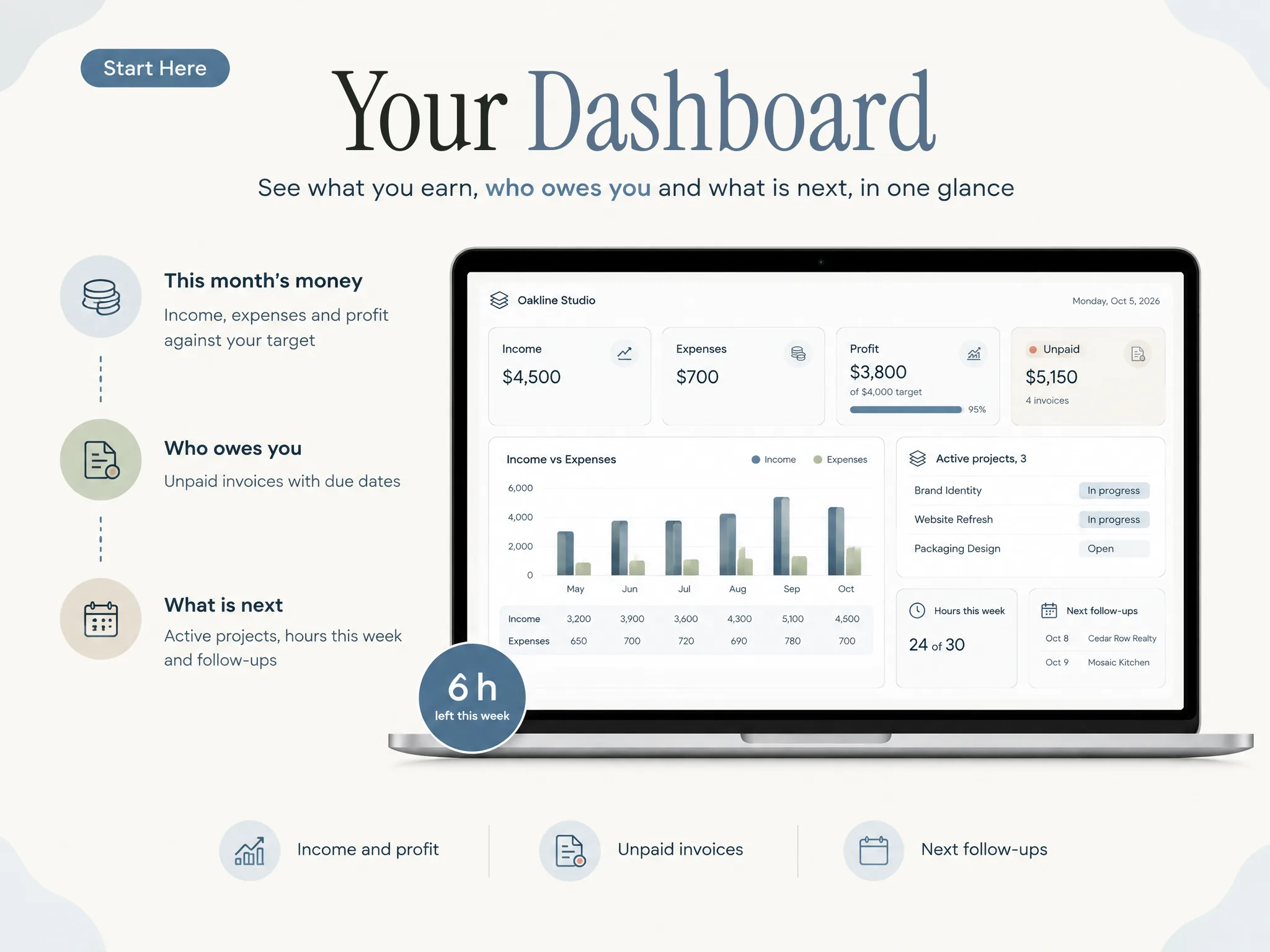
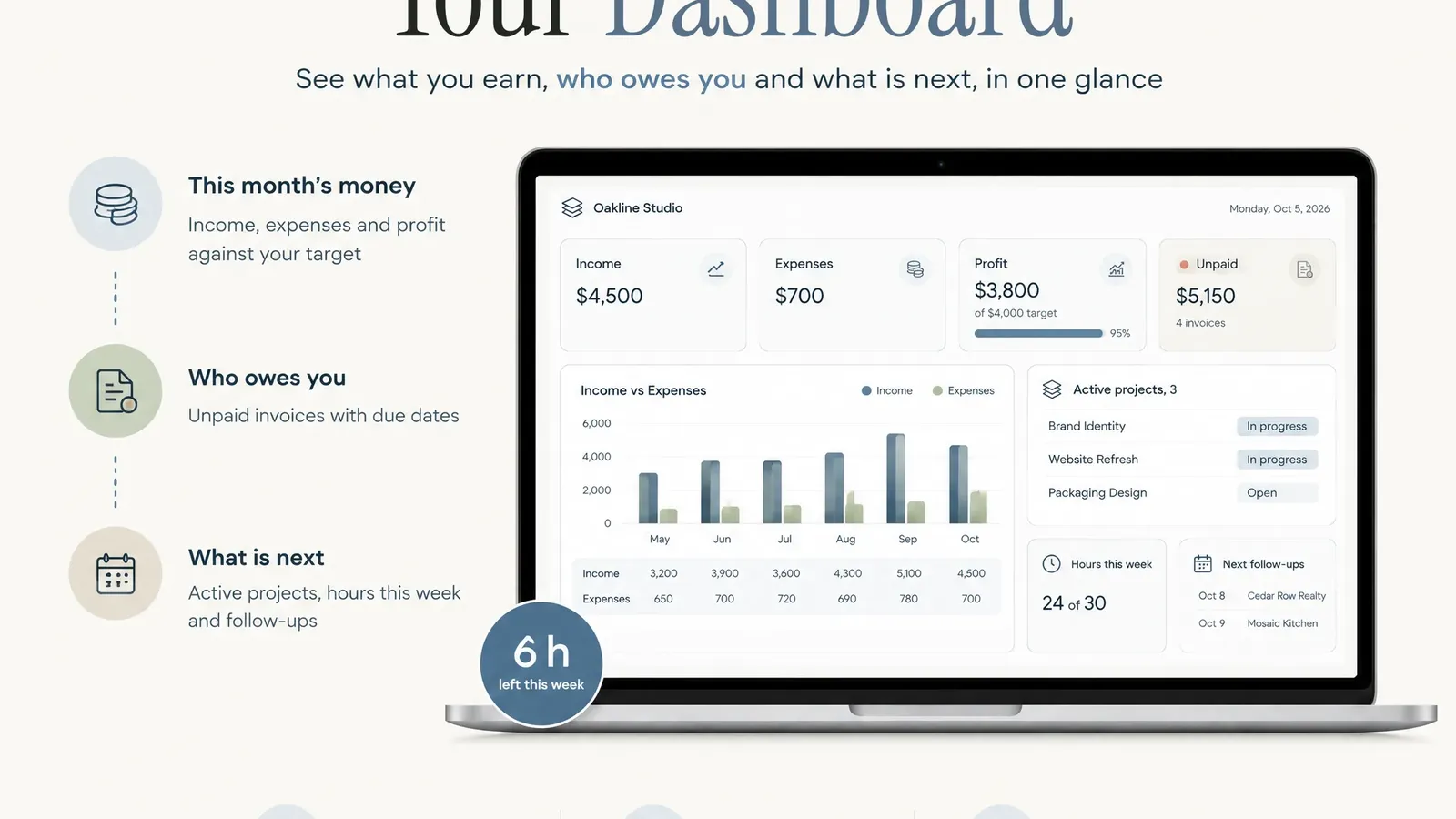
The Dashboard summarizes this month's income and profit against the target you set, unpaid invoices, active projects, hours logged this week and upcoming follow-ups. It is a starting view for a review. You still need to keep the underlying entries current. The product images on this page show sample workspace data, not a customer's business records.
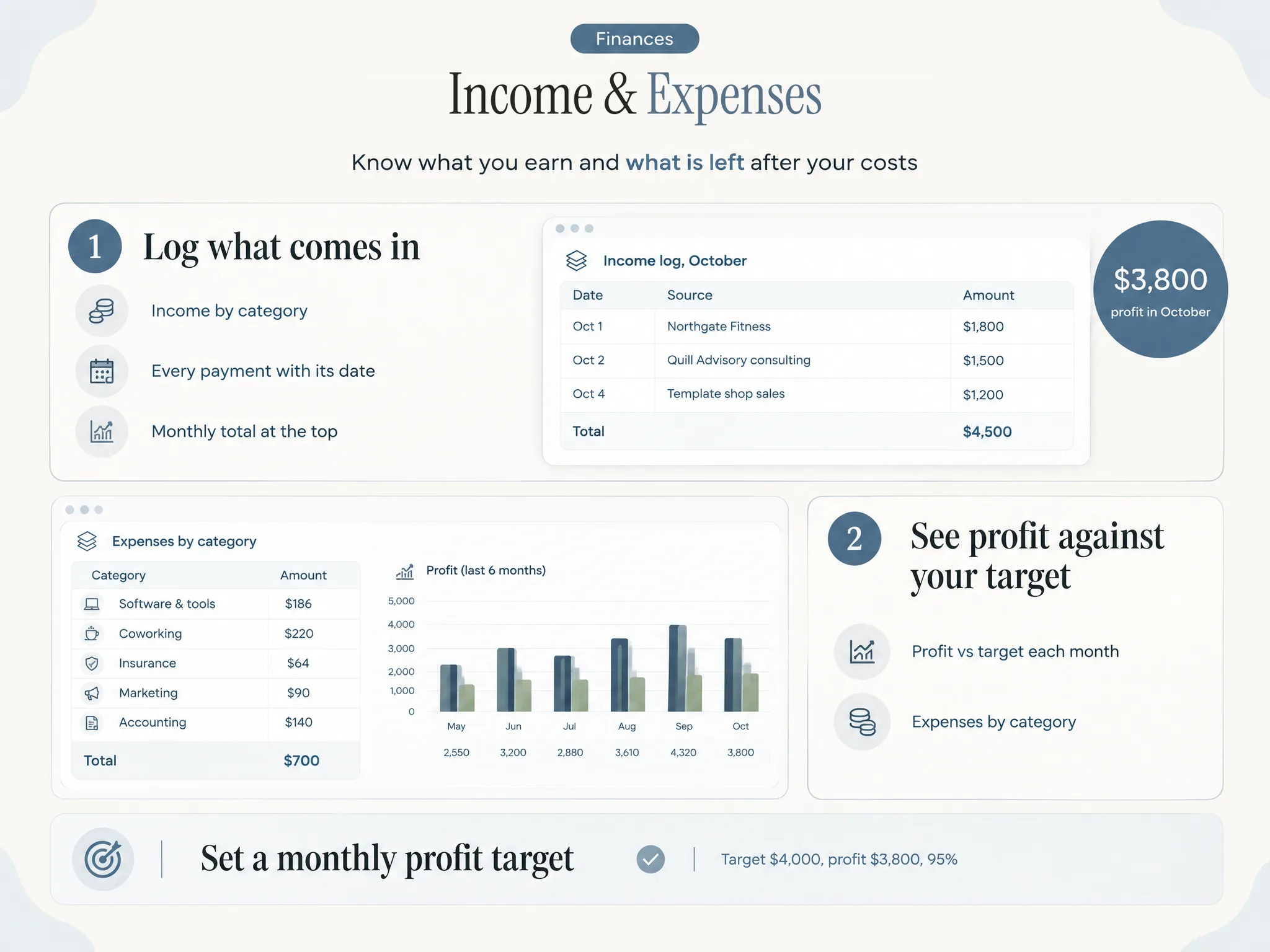
The Finances area tracks income and expenses by category, profit against a target and invoices with due dates and paid or unpaid status. The tax set-aside applies the percentage you enter to income. It is an estimate for organizing money, not tax advice or a tax calculation service.
Read the Dashboard as a Set of Signals
Read the target, unpaid balance and logged hours together before choosing a next action. In the sample dashboard shown above, income is $4,500, expenses are $700 and profit is $3,800 against a $4,000 target. That leaves a $200 gap. The same sample view lists $5,150 in unpaid invoices and 24 of 30 planned weekly hours.
Those figures are examples from the product image, not customer results. For example, they show why one total can mislead: profit sits below target while the unpaid amount is larger than the gap, and the hours view says four-fifths of the planned week has been logged. A solo operator might check invoice follow-ups and remaining project hours before changing the income target. The dashboard makes those items visible together; it does not decide which invoice to chase or whether a project is profitable.
When you compare planners, check whether the first page helps you connect a result to an action. A dashboard that only repeats totals may look tidy while leaving you to search elsewhere for due dates, projects or next steps. The Notion Business Planner's dashboard includes those items in the published feature description, so the sample image can be read as a review prompt rather than a promise about business outcomes.
Client Pipeline holds prospects and follow-ups. Projects and Documents keeps project information, budgets, hours and related files together. The Brand and Services page lists services, pricing and an effective hourly rate per project. Productivity includes daily, weekly and monthly planning with time tracking. Marketing has a page for each channel, and Self-learning tracks courses and skills with progress.
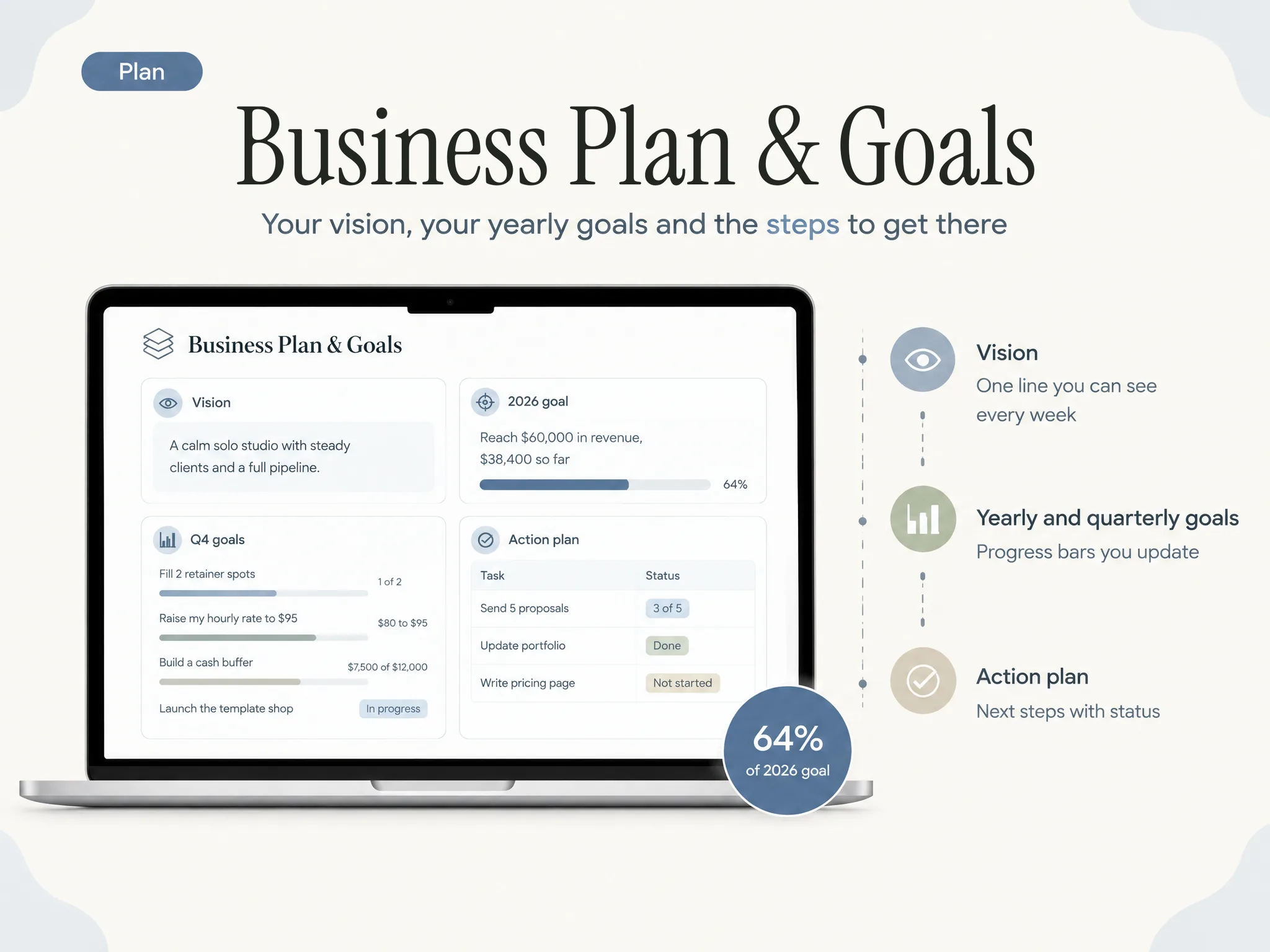
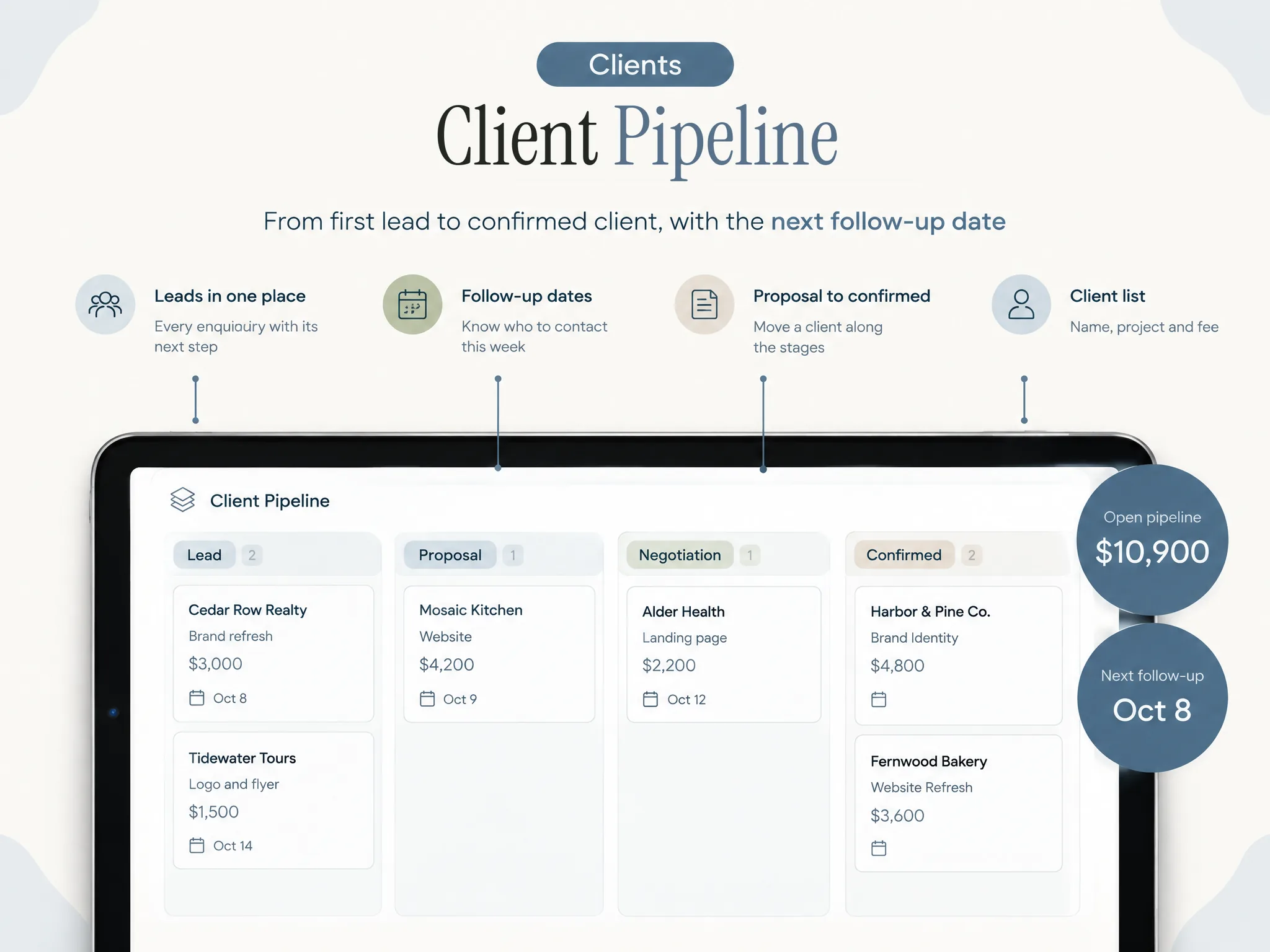
The Notion Business Planner landing page lists the complete contents and current offer. It is a $9 one-time template. Compare that list with the checklist above, especially if you need accounting, invoicing or team permissions beyond what the template describes.
Check the Workflow Before You Commit
A planner is a fit when its pages support the reviews you already do. Before you duplicate a template or build your own, walk through a sample week and month on paper.
- On Monday, decide which projects and follow-ups need attention.
- During the week, record project hours and any invoice status changes.
- At month end, compare income, expenses and profit with your target.
- At quarter end, review the goals and choose the next actions.
For each step, ask where the information comes from and who enters it. If the same number has to be copied into several unrelated pages, the setup may become tiring to maintain. If the process touches regulated accounting or tax records, keep the required system of record and use the planner as an organizing layer only.
The Notion Free plan is currently listed for individual use on Notion's pricing page. Plan limits can change, and team collaboration or larger file uploads may have different requirements, so check the current details if those matter to your setup.
A Simple Monthly Review for a Solo Business
Use one monthly review to turn records into a short list of decisions. You do not need a complicated dashboard if four questions tell you what to do next.
| Review question | Record to check | Next action |
|---|---|---|
| Did income meet the target? | Income and profit for the month | Adjust next month's target or sales activity |
| What is still unpaid? | Invoice status and due dates | Follow up on the items that need it |
| Which work used the most time? | Hours by project | Revisit scope or pricing for future work |
| Which goal moved forward? | Quarterly goals and actions | Keep, change or drop the next step |
These prompts help you review your records. The worked example uses made-up placeholder figures to show the arithmetic and a follow-up decision. It is not a customer result.
Worked example (illustrative placeholders): income is $800 against a $1,000 monthly target, with $200 in expenses. Profit is $600 ($800 minus $200), and income is $200 below target. One unpaid $250 invoice is listed. A useful review note would be: “Follow up on the unpaid invoice, then check whether next month's work plan can close the target gap.” The figures are fictional and show a review method only.
For more on running the review itself, see this six-signal weekly routine for a one-person business. Keep the monthly check short enough that you will reopen it next month.
When a Ready-Made Planner Makes Sense
A ready-made planner can save setup time if its pages match your work and you are comfortable maintaining them. Compare the included pages, the amount of manual entry and the limits of the tool before you decide.
The Notion Business Planner may suit a solo service provider who wants goals, finances, invoice status, client follow-ups, projects, time planning, marketing and learning pages in one template. Choose another system for sending invoices, reconciling transactions, filing taxes or running a team process. Those functions do not appear in the published contents list.
Research method: this guide's feature descriptions were checked against the published contents list, product descriptions and showcase images on the landing page on 26 October 2026. The image figures are sample values. We have not treated them as customer data, a performance result or a claim that the template automates the work. The checklist above is a decision aid for comparing the described pages with your own routine.
Editorial note: we fact-checked the product claims against those published materials. The checklist is our comparison framework, not a review based on customer results.
Choose a ready-made setup when its listed pages cover work you currently manage across separate places. Build your own workspace when you want fewer pages or a workflow built around different tools.
Frequently asked questions
What should a Notion business planner include?
For a solo service business, start with goals, income and expenses, invoice status, clients, projects, hours and a weekly review. Add marketing or learning pages when you have a reason to use them.
Can I use Notion as a business planner?
Yes. Notion pages and databases can keep plans, projects and business records in one workspace. You still enter and review your own information.
Is a Notion business planner the same as accounting software?
No. Use a planner to organize records and review targets. Keep your accounting software, tax advice and required filing process in place.
Can I build a business planner in Notion for free?
Notion lists a Free plan for individual use. You can build pages yourself or start from a template. Check the current plan details if you need team features or larger file uploads.
What does the Notion Business Planner template include?
It includes a dashboard, business plan and goals, finances, invoices and a tax set-aside from a percentage you enter, client pipeline, projects, brand and services, productivity, marketing, self-learning and a getting-started page.
Does the planner calculate my taxes?
No. It applies the percentage you enter to income as an estimate of what to set aside. Choose that percentage using guidance appropriate to your situation.
Should I buy a business planner template or build my own?
Build your own if you want to choose each page and relation. A ready-made template can save setup work when its contents match the reviews you already perform.
Sources
Keep reading
Plan the Business
Freelance Business Plan: A One-Page Plan You Can Fill In Today
Freelance business plan in one page: six sections to fill in, a worked example for a solo designer, and a quarterly review so the plan stays alive.
· 8 min read

Plan the Business
One Person Business: Six Things to Track Each Week
One person business owners can track six signals each week to see open work, unpaid invoices, hours and profit, with a simple review and example.
· 8 min read
Plan the Business
Quarterly Planning for a One-Person Business: A 3-Hour Session, Step by Step
Quarterly planning for one person, run as a single session: review last quarter, count your real hours, pick up to three goals and book your review dates.
· 9 min read
